


How consistent are the Azure deployment times?





It has been a while since a publication in the development section, but that does not mean there is no development on that side. This article will go deeper into the deployment strategy at GO-EUC and how the repository is structured. This article will also give additional information on how new solutions and products can be added to the deployment. As an example, Parallels Application Server (RAS) will be added to the repository.
Before diving into the details, it is essential to understand what Parallels RAS is and its overall architecture.
Parallels RAS is a solution that enables organisations to deliver Windows applications and desktops to users from on-premises or cloud infrastructure, including Azure, Azure Virtual Desktop, and AWS.
For more general information, please visit the Parallels website.
A Parallels RAS deployment consists of the following components:
Farm is a collection of Parallels RAS components maintained as a logical entity with a unique database and licensing.
Site is a managing entity usually based on a physical location. Each site consists of at least a RAS Connection Broker, RAS Secure Gateway, and agents installed on RD Session Hosts, virtualization servers, and Windows PCs. There can be multiple sites in a given farm.
RAS Connection Broker provides access to published applications and desktops and load balances application traffic. High availability can be achieved by adding a secondary RAS Connection Broker to a site.
RAS Secure Gateway is a service that acts as a proxy between the Parallels Client software running on client devices and Parallels RAS. A Secure Gateway encrypts the communications using SSL. Multiple RAS Secure Gateways can work in high availability mode with Parallels HALB.
RAS RD Session Host Agent is installed on an RD Session Host and enables publishing of server resources (applications and desktop). RAS RD Session Host Agent also collects the necessary information from the server on which it’s running and sends it to the RAS Connection Broker, which uses it for load balancing and some other purposes.
For all the details visits the Parallels RAS components page.
While it is not recommended by default, in small or lab environments, these main infrastrcuture roles can be consolidated onto a single server.
For more information on deployment, please check the Parallels RAS Reference Architecture.
Repository structure It is essential to have a clear structure in your repository, as this eases addition, improves development, maintenance, and collaboration on the project. For the GO-EUC deployments, the decision was made to organize based on technology and tooling, on the hosting platform, and on the delivery platform, respectively. As an example, Terraform could be the technology tooling used, VMware as the hosting platform, and lastly Parallels RAS as the delivery platform.
For the deployments in the go-euc lab environment, the solution is standardized on the following technologies and tools:
For more information about these tools and why they were chosen, please refer to the previous development article.
The structure used is also reflected in the actual repository that is set up for GO-EUC. In the table below is a detailed breakdown of the underlying directory structure in the root of the repository.
As a reminder, the repository is the file storage structure used to hold the text based files (like .tf, .pkr.hcl, .yml), managing infrastructure code (Terraform), machine images (Packer), and server automation (Ansible), often in separate directories or projects, but version-controlled together to automate building custom server images (Packer+Ansible) and deploying/configuring infrastructure (Terraform+Ansible) for consistent, repeatable deployments.
| Folder | Technology | Description |
|---|---|---|
| .assets | N/A | Images that are used in the README.md. |
| .devops | Azure DevOps | Pipelines related to the Azure DevOps. |
| .github | GitHub | GitHub configurations, including the workflows. |
| ansible | Ansible | Ansible playbooks and roles. |
| docker | Docker | Docker configurations. |
| init | PowerShell | The initialization scripts to set up the lab are written in PowerShell. |
| manifest | Packer | Packer manifest locations are an empty repository and could be moved to another location. |
| packer | Packer | The packer deployment for various platforms. |
| terraform | Terraform | The infrastructure as code configurations for various platforms. |
| tests | N/A | Test configuration for CI validations. |
When adding new technologies, whether it is a new hosting platform or adding a new delivery solution, the deployment needs to be updated. In our example of adding a new delivery solution, these typically require additional server infrastructure. The server infrastructure needs to be deployed, the servers configured, and software installed on the newly deployed servers. In the case of our example of Parallels RAS, such a deployment contains RAS-specific components. As this is a lab environment, the roles mentioned previously will be combined on a single server. The other components, like the servers and infrastructure required for Active Directory etc, are shared among deployment platforms.
Below is a diagram of a typical RAS deployment:
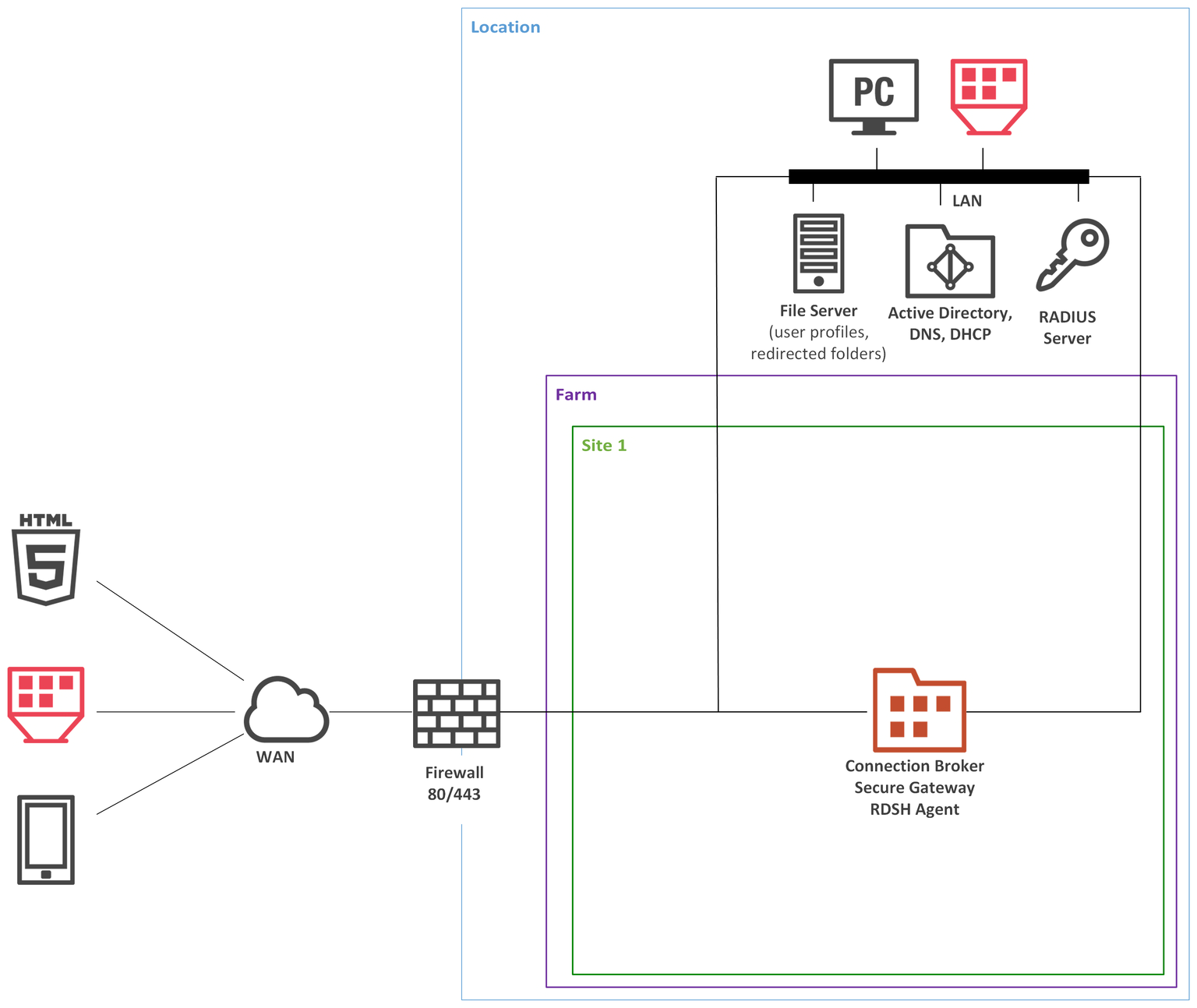
In this specific example, there are no changes required by Packer, however, it does require some basic understanding of how it works. So, in the case of the VMware deployment, you need to ensure there are some templates available. For Packer, there is a default configuration that creates a new template based on the original Microsoft ISO files. That is done for Windows Server 2019, 2022, and 2025, as well as Windows 10 (obsolete) and Windows 11.
In the case of VMware, a manifest file is created and used as input to Terraform to determine which template to use for the base deployment. In a public cloud, this is not required, as a new virtual machine can be deployed directly with a gallery image from the cloud provider.
As Packer is producing the default server and client templates, we can directly use these to deploy new machines where we can install and configure software on them via Ansible. Therefore, no changes are required in the existing Packer configuration.
In a dedicated article about Packer more insights will be provided, but for now, this is enough.
For the on-premises deployments, the default at the time of writing is VMware, so in this case, a change needs to be made in the infra part. From the GO-EUC framework perspective, it does support the setup of the vSphere environment so therefore, in the platform directory, there are multiple Terraform configurations for the build, datacenter, infra, and vcsa (vCenter Server Appliance).
The resource.tf file in the infra directory contains the servers that need to be deployed. As multiple delivery solutions are supported, a boolean switch has been added to determine if that server needs to be deployed. In this case, a single server has been added for the Parallels RAS server, which is going to be the primary gateway and console server. Please note this is done based on a module, which defines the standard deployment of a resource based on a VMware template that is created by Packer.
As Terraform is primarily used for deploying and configuring the infrastructure, the software installation and configuration is done by Ansible, but in order to have an interaction, the inventory is defined in Terraform. This is done in the ansible.tf file where various groups are created. This way, Ansible is able to generate an inventory file by directly interacting with the state file via Terraform.
In all scenarios, Ansible is used for the installation and configuration of the software and roles. As explained, Terraform will produce the inventory file, so in the inventory.yml file, there is a pointer towards the project. When writing this specific article, this part is refactored, so it is expected to have platform-specific inventory files that point to the correct Terraform location.
By default, roles are used to install and configure specific software, so for Parallels RAS, a dedicated role is created. In this role, a tasks directory is required that contains the main.yml. This is the primary role playbook that will be executed. Now, to have a clear distinction between installation and configuration, separate YAML files are created that are imported into the main.yml.
As for most software, these are not publicly available, so in order to download and install the software, it needs to be made available. A Docker container using NGINX is used to serve the software in the lab environment, so prior to executing the playbook, this needs to be done. Now, to provide some context, a variable file in the vars has been created that contains some basic information, such as version and location of the software.
In most cases, the configuration of software is done using PowerShell, but as Ansible is a declarative approach, there is a strong preference to not just execute a script via Ansible, as you lose the declarative behaviour. Instead, a library PowerShell script is created. This allows you to create your own declarative logic for configuring software. As this does not exist for Parallels RAS, both Leee Jefferies and Ryan Ververs-Bijkerk, have created this logic from scratch so there is the ability to configure Parallels RAS via Ansible, which you can find on the GO-EUC GitHub.
For Parallels RAS, a ras_farm.ps1 PowerShell library script is created that allows you to create or remove a Parallels RAS farm deployment. This can be referenced in an Ansible playbook or role file that will take care of the configuration of Parallels RAS:
---
- name: Create Parallels RAS Farm
 ras_farm:
   gateway: "ras.go.euc"
   username: "gouser"
   password: "XXXXXXXXXX"
   provider_type: "VCenter"
   provider_server: "vcsa..go.euc"
   provider_username: "administrator@vpshere.local"
   provider_password: "XXXXXXXXXX"
   provider_version: "v8_0"
   state: present
 vars:
   ansible_become: true
   ansible_become_method: runas
   ansible_become_user: "ansible"
   ansible_become_password: "XXXXXXXXXX"
This logic can then be referenced in an underlying role or task.
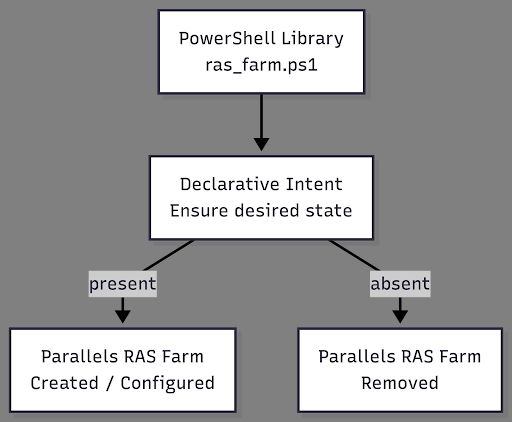
There is a lot of information here which can be overwhelming, but with some basic understanding on the setup, this example does show how relatively easy it is to add a new delivery solution such as; Parallels RAS to the lab deployment. Having a framework like this allows you and GO-EUC to deploy the infrastructure in a consistent way to ensure it can be rebuilt for new researches and tests when needed.
The diagram below shows how the framework is set up based on layers, where the key part is the automation in combination with the cloud services. It also gives some insights into the technology used. Please note that this project is a work in progress and heavily under construction by the team, and as the change of technology goes quickly in our industry, it can be challenging to complete.
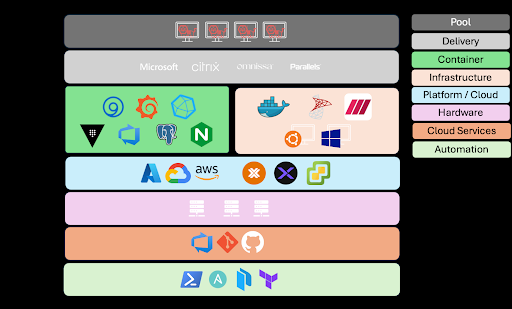
Having a framework like this allows GO-EUC to deploy infrastructure reliably and consistently, which is fundamental to producing high-quality researches. If you have any questions or comments, please let us know.
Photo by Venti Views on Unsplash

Berlin, Germany

Billund, Denmark

Nieuwegein, Netherlands

Malta